
What's new
LiteRECORDS

Register a free account today to become a member! Once signed in, you'll be able to participate on this site by adding your own topics and posts, as well as connect with other members through your own private inbox!

  • Guest, before your account can be reviewed you must click the activation link sent to your email account. Please ensure you check your junk folders.
    If you do not see the link after 24 hours please open a support ticket.

Demucs - Stems Extraction Tool

djtayz

Executive Producer
Demucs is a Music Source Separation tool for extracting 4 stems - Drums, Bass, Vocals, Synths. It's by far the best one I've heard.

You can find the GitHub project here - https://github.com/facebookresearch/demucs

We will be installing it in the cloud, using Google Colab, and processing tracks with the default model that it comes with. You can also read how to train it with your own dataset.


STEPS:


1. Download this archive and upload the folder "Demucs" to your Google Drive.
https://mega.nz/file/ZHxjGBjJ#NUuH7kpbTknDurDng4gMv5khoUyxsMjEfb_fViSweVI

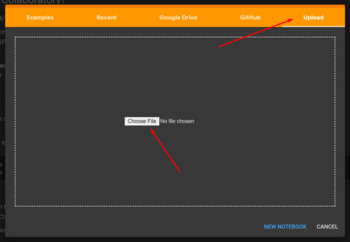
2. Go to https://colab.research.google.com/ and click on "Upload".

3. Download this file and upload it to Google Colab.
https://mega.nz/file/wH5n3TQI#Zk79MIGEssl1Rug126b88PFF0--1NqOz8vXC0e7_CUE


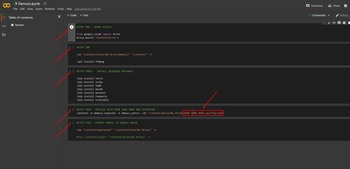
4. Play all the steps in a row, waiting for each one of them to finish first.


Disclaimer: The second step sometimes could take very long time to finish. Some time it will be 2 minutes, other times - 15 minutes. I can't fix that.​
5. When you get to the fourth step, click on the orange/pink text and only edit the name of the song with your chosen one.
Make sure the extension (.flac/.wav/.mp3 etc.) is correct. The song should be found straight in your Google Drive.

First, it will download the pre-trained model, which takes about 4-5 minutes, and after that, it will split your song which takes roughly the same time, if not quicker.

6. After you've played the last step (exporting your stems to your Google Drive), you should find your audio files in a new folder "separated" >> "demucs_extra".


Disclaimer 2: Most of the time, it picks up background vocals as synths, though not all of them. This is a known downside.
 
Last edited:
[MENTION=26971]djtayz[/MENTION] I get to step 4 and get this:

#STEP FOUR - REPLACE WITH YOUR SONG NAME AND EXTENSION
!python3 -m demucs.separate -n demucs_extra --dl "/content/drive/My Drive/EMIBV.flac

/bin/bash: -c: line 0: unexpected EOF while looking for matching `"'
/bin/bash: -c: line 1: syntax error: unexpected end of file.
 
Last edited:
[MENTION=26971]djtayz[/MENTION] I get to step 4 and get this:

#STEP FOUR - REPLACE WITH YOUR SONG NAME AND EXTENSION
!python3 -m demucs.separate -n demucs_extra --dl "/content/drive/My Drive/EMIBV.flac

/bin/bash: -c: line 0: unexpected EOF while looking for matching `"'
/bin/bash: -c: line 1: syntax error: unexpected end of file.

Make sure the path to your song has quotations marks. Maybe try removing the number three from "python3"?
 
Make sure the path to your song has quotations marks. Maybe try removing the number three from "python3"?

It was the missing quotations in it. I'd mention that in the main post just for good measure and also with an actual track example listed. But it's working now. I realized the quotes part just before seeing the reply.
 
Last edited:
I know it looks hard but it's very easy to follow. At the bottom of the first thread, there is a video tutorial on this, just using a different tool. The files that you upload are different but the rest (how you install it) is the same, you just click the play buttons one by one.
http://literecords.com/showthread.php?65004-Powerful-New-Vocal-Remover-AI-Instructions


I tried this method dear friend :(
but when it comes to this step:

2. Once Python has installed, open the Windows Command Prompt and run the following installs -

- If you plan on doing conversions with your Nvidia GPU, please install the following -

pip install torch==1.5.0+cu101 torchvision==0.6.0+cu101 -f https://download.pytorch.org/whl/torch_stable.html


THERE'S AN ERROR !! (Could not find a version that satisfies the requirement torch==1.5.0+cu101 (from versions: 0.1.2, 0.1.2.post1, 0.1.2.post2)


I use Spleter GUI2.5 . I want to know if it really comes an even better result than Spleeter. ...
 
Last edited:
I tried this method dear friend :(
but when it comes to this step:

2. Once Python has installed, open the Windows Command Prompt and run the following installs -

- If you plan on doing conversions with your Nvidia GPU, please install the following -

pip install torch==1.5.0+cu101 torchvision==0.6.0+cu101 -f https://download.pytorch.org/whl/torch_stable.html


THERE'S AN ERROR !! (Could not find a version that satisfies the requirement torch==1.5.0+cu101 (from versions: 0.1.2, 0.1.2.post1, 0.1.2.post2)


I use Spleter GUI2.5 . I want to know if it really comes an even better result than Spleeter. ...

This thread is about installing it on Colab, just follow my steps here, not from GitHub.
 
I tried this method dear friend :(
but when it comes to this step:

2. Once Python has installed, open the Windows Command Prompt and run the following installs -

- If you plan on doing conversions with your Nvidia GPU, please install the following -

pip install torch==1.5.0+cu101 torchvision==0.6.0+cu101 -f https://download.pytorch.org/whl/torch_stable.html


THERE'S AN ERROR !! (Could not find a version that satisfies the requirement torch==1.5.0+cu101 (from versions: 0.1.2, 0.1.2.post1, 0.1.2.post2)


I use Spleter GUI2.5 . I want to know if it really comes an even better result than Spleeter. ...

Demucs is WAY better
 
Wow! This is amazing, thanks for sharing!

Steps were really clear and simple too which was a bonus.

I've run a couple of example songs so far and it's by no means perfect, but really, really good separation and enough for what I need to use it for :D


Disclaimer 2: Most of the time, it picks up background vocals as synths, though not all of them. This is a known downside.

No. Not a downside at all. Has to have a little fair give to everyone for there fancy in music. The downside is both ways. I don't always get the backing vocals and in the karaoke aspect of things they are needed.
 
No. Not a downside at all. Has to have a little fair give to everyone for there fancy in music. The downside is both ways. I don't always get the backing vocals and in the karaoke aspect of things they are needed.

Agree it can be useful in some cases. But it's a little uncertain when it comes to background vocals - you can hear them, but they're quiet. Not anything like fully preserving them, as there are thousands of ways to add, mix and master background vocals, it's almost impossible to know them all. That's probably why anjok also isn't fully confident in releasing a model trained on tv tracks.
 
Agree it can be useful in some cases. But it's a little uncertain when it comes to background vocals - you can hear them, but they're quiet. Not anything like fully preserving them, as there are thousands of ways to add, mix and master background vocals, it's almost impossible to know them all. That's probably why anjok also isn't fully confident in releasing a model trained on tv tracks.

multiman said something about using an "extras model" in his use of Demucs. He may be doing Demucs with command-line. This is not to say it's for backing vocals but would be wondering if that is already in the colab version or if not could you get with multiman to see if it's possible to add it? If only for other improvements? Post referenced is here. http://literecords.com/showthread.p...It-Doesn-t-Matter-(DIY-Stems)-(upd-2020-06-09)
 
multiman said something about using an "extras model" in his use of Demucs. He may be doing Demucs with command-line. This is not to say it's for backing vocals but would be wondering if that is already in the colab version or if not could you get with multiman to see if it's possible to add it? If only for other improvements? Post referenced is here. http://literecords.com/showthread.p...It-Doesn-t-Matter-(DIY-Stems)-(upd-2020-06-09)
He says in that thread he had an instrumental and TV track to that song, which is how he got the backing vocals out.