What's new
LiteRECORDS

Register a free account today to become a member! Once signed in, you'll be able to participate on this site by adding your own topics and posts, as well as connect with other members through your own private inbox!

  • Guest, before your account can be reviewed you must click the activation link sent to your email account. Please ensure you check your junk folders.
    If you do not see the link after 24 hours please open a support ticket.

Powerful New Vocal Remover AI - Instructions

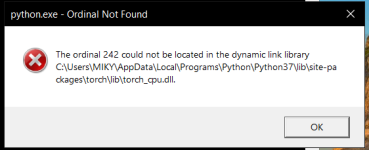
Hello! I followed all the instructions and installed everything but when I try to launch the vocal remover I get the following error:

View attachment 657

I tried reinstalling Python and all the files but it didn't solve the issue. I don't have any experience with Python so I'd appreciate if anyone could help me with this issue.

Do you have Nvidia GPU with CUDA cores?
 
Hello! I followed all the instructions and installed everything but when I try to launch the vocal remover I get the following error:

View attachment 657

I tried reinstalling Python and all the files but it didn't solve the issue. I don't have any experience with Python so I'd appreciate if anyone could help me with this issue.

Which version of PyTorch did you install?

I reference 2 in the main thread, one with Cuda and one without.
 
***Update***

The GUI has been updated! I uploaded the new version to the main thread along with an explanation of the new model and new options. I will be working on some new models in the near future.

Enjoy!
 
***Update***

The GUI has been updated! I uploaded the new version to the main thread along with an explanation of the new model and new options. I will be working on some new models in the near future.

Enjoy!

Giving the new GUI a spin with a song that is just bass, piano and some strings+vocals to see if the residue can be cleaned up. How well could this work for older Guitar Hero songs that were only 3 stems?
 
Giving the new GUI a spin with a song that is just bass, piano and some strings+vocals to see if the residue can be cleaned up. How well could this work for older Guitar Hero songs that were only 3 stems?

I haven't tested it on tracks like that yet. I found that acoustic, orchestral, or other lighter tracks can benefit with more passes through the stacked model.

Let me know how it works for you!
 
I have GeForce GTX 950M and I installed the CUDA driver specified in the tutorial as well.

I apologize for the confusion, I didn't see this response.

That GPU is a little old and might not support the version of Cuda needed to run this AI on the GPU. Did you also install the Cuda driver that links to the Nvidia website, or did you just install the version of PyTorch that includes Cuda?

If you keep having issues, try installing the CPU version of PyTorch.
 
Last edited:
I haven't tested it on tracks like that yet. I found that acoustic, orchestral, or other lighter tracks can benefit with more passes through the stacked model.

Let me know how it works for you!

Oh I will let you know. i wanna help improve with feed back as much as possible. I'm gonna send you couple tracks for you to work with to see if the models can be improved more. If you can get these tracks to be entirely vocaless you'll have it made.
 
***Update***

First off I just want to say thank you to [MENTION=10167]NewAgeRipper[/MENTION] for doing an excellent job on the tutorial and for the shout-out!

I'm ironing out some bug in the update and it should be released sometime this week for sure! I'm trying to make sure that all of my future releases can be universally run with no issues before releasing them. I've had some help from a gifted Python coder to help bring my vision for GUI to life and I'm VERY happy with the options we were able to add to make it the best!

To clarify, the stacked model was trained on pairs consisting of conversions of mixes and official instrumentals. The point was reduce the vocal pinches and audio static in some tracks. The model works best when a track is run through it more than once and that is where the "Stack Passes" option comes in. The amount of conversion passes needed to reduce the vocal pinches will vary from track to track.

Regarding the possibility of having an AI that keep background vocals for karaoke tracks - I'm not entirely sure how effective it would be considering how I would train the AI to keep them in. The results are not consistent enough. This is something that will need to be thoroughly tested and will require a lot most research.

Ok this is weird I tried out the new gui with the multi pass option on GNR's Sweet Child O Mine and it came out terrible compared to the colab version. My settings were using stacked model with stack passes set at 2.. Did I do something wrong? Files below..

Stacked Model
https://www.mediafire.com/file/aqb1xat0rbfi0wx/SCOM2pass.7z

Colab version
https://www.mediafire.com/file/2ds3kmtqb76luxk/SCOMcolab.7z

The differences are night and day
 
Ok this is weird I tried out the new gui with the multi pass option on GNR's Sweet Child O Mine and it came out terrible compared to the colab version. My settings were using stacked model with stack passes set at 2.. Did I do something wrong? Files below..

Stacked Model
https://www.mediafire.com/file/aqb1xat0rbfi0wx/SCOM2pass.7z

Colab version
https://www.mediafire.com/file/2ds3kmtqb76luxk/SCOMcolab.7z

The differences are night and day

Same for me with the track I tried. more vocal bits were left in the instrumental than with not using it.
 
Unfortunately, trying the stack model, my songs also came out with almost nothing removed, just some high ends of the vocals. I tried the stack model only, then stack + passes, then multi-genre + passes.
 
You need to convert the song first with the Multi-Genre Model

Then you convert the instrumental with the stacked model, and it removes additional left-over vocals, mostly in the mid-high range.

The Multi-Genre model and other main models like it are the primary remover models.
The stacking style models are the second, third, fourth pass etc.

Bear in mind that each additional pass with the stacking model will bear less results. The first pass will always yield mostly vocals, and additional passes will yield more instrumentation, so the trick is figuring out the sweet spot. How many passes get the audio as good as it can before it starts to degrade. Also, some 'parts' of a track may do better with more passes than other 'parts'. So really, if you want to be a perfectionist... you need to look over every additional vocal track that the stacking model provides and decide what to reinsert into the instrumental, like you would with the original Multi-Genre Model conversion.

Unfortunately, trying the stack model, my songs also came out with almost nothing removed, just some high ends of the vocals. I tried the stack model only, then stack + passes, then multi-genre + passes.

All this being said, if you all are converting with the Multi-Genre first and then the Stacking Model and getting poor results, ... then there is a bug. :)
 
Last edited:
You need to convert the song first with the Multi-Genre Model

Then you convert the instrumental with the stacked model, and it removes additional left-over vocals, mostly in the mid-high range.

The Multi-Genre model and other main models like it are the primary remover models.
The stacking style models are the second, third, fourth pass etc.

Bear in mind that each additional pass with the stacking model will bear less results. The first pass will always yield mostly vocals, and additional passes will yield more instrumentation, so the trick is figuring out the sweet spot. How many passes get the audio as good as it can before it starts to degrade. Also, some 'parts' of a track may do better with more passes than other 'parts'. So really, if you want to be a perfectionist... you need to look over every additional vocal track that the stacking model provides and decide what to reinsert into the instrumental, like you would with the original Multi-Genre Model conversion.


All this being said, if you all are converting with the Multi-Genre first and then the Stacking Model and getting poor results, ... then there is a bug. :)

Ah, gotcha. I ran an already converted track through the stack model and now I see what you meant. It actually does work quite well, I'm pleased with the results.
 
Thank you so much for explaining that ChrisCall!

I apologize everyone! I should have made that clearer in my first update. The stacked model is ONLY for tracks converted through the Multi-Genre Model. The stacked model is essentially a "clean up" model.
 
Thank you so much for explaining that ChrisCall!

I apologize everyone! I should have made that clearer in my first update. The stacked model is ONLY for tracks converted through the Multi-Genre Model. The stacked model is essentially a "clean up" model.

No worries man. Your work is highly appreciated. Brad even wants to promote it once it hits a level he's comfortable with backing. You're doing huge leaps and bounds. A little more and nothing can touch what you do.
 
[MENTION=14972]ChrisCall[/MENTION] Good call. pun intended. Thanks for pointing that out. Trying it now with a track already ran through the colab method. I'll post results from that method and then try it running untouched track through multigen then stacked.
 
I apologize for the confusion, I didn't see this response.

That GPU is a little old and might not support the version of Cuda needed to run this AI on the GPU. Did you also install the Cuda driver that links to the Nvidia website, or did you just install the version of PyTorch that includes Cuda?

If you keep having issues, try installing the CPU version of PyTorch.

I installed the Cuda driver linked in the post but during the installation I did get a pop-up saying the installer couldn't find an appropriate driver and some functions may not work properly. I removed the driver and installed the CPU version and now I'm getting another error:

error2.png
 
[MENTION=14972]ChrisCall[/MENTION] Good call. pun intended. Thanks for pointing that out. Trying it now with a track already ran through the colab method. I'll post results from that method and then try it running untouched track through multigen then stacked.

Got me curious to hear your results