What's new
LiteRECORDS

Register a free account today to become a member! Once signed in, you'll be able to participate on this site by adding your own topics and posts, as well as connect with other members through your own private inbox!

  • Guest, before your account can be reviewed you must click the activation link sent to your email account. Please ensure you check your junk folders.
    If you do not see the link after 24 hours please open a support ticket.

Powerful New Vocal Remover AI - Instructions

I agree with chilin. Try the Google colab version. Also in the upper left of the colab page after setting up there's a runtime button, you can click and scroll down to change runtime to GPU to get even faster conversions sometimes. Just follow my video on the main post. Super simple.

Has option of GPU or TPU under runtime so what exactly is TPU?
 
That is not working. Would you mind using a proper example? Would be a big help. Is it "/content/drive/My Drive/NWTB.flac -gpu 0" or "/content/drive/My Drive/NWTB -gpu 0.flac" or.....? LMAO.

"/content/drive/My Drive/NWTB.flac" --gpu 0

Now it only takes 17 seconds for a track
 
Since it's definitely faster using Colab's GPU, I will update the files so that you don't have to mess with the code and settings.
 
Hello
A friend of mine tried the google Colab method, I even tried step by step with him and we did exactly the same stuff but he can't make it work.
He has an account on this forum but can't see this section so I'm posting for him (his login is Ido26)

Here is his message :
hello there and thanks for this software ! Can't wait to use it..
i've some issues after installing and trying
i used the second method with google drive
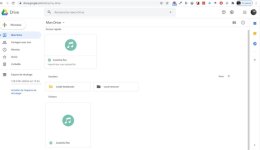
i did it well (i think) : uploading the vocal-remover folder, uploading the track also in the right place (here is a screenshot)
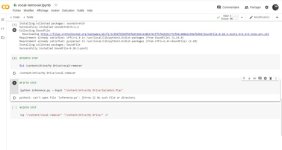
It's ok until the 5th part and here is the error message :
(by the way, i already tried to reupload all the stuff and verified : the famous unfound file is still present)
Can someone help me ?
I tried with 2 different googledrive's accounts

captur13.jpg
captur14.jpg
 
Hello
A friend of mine tried the google Colab method, I even tried step by step with him and we did exactly the same stuff but he can't make it work.
He has an account on this forum but can't see this section so I'm posting for him (his login is Ido26)

Here is his message :
hello there and thanks for this software ! Can't wait to use it..
i've some issues after installing and trying
i used the second method with google drive
i did it well (i think) : uploading the vocal-remover folder, uploading the track also in the right place (here is a screenshot)
It's ok until the 5th part and here is the error message :
(by the way, i already tried to reupload all the stuff and verified : the famous unfound file is still present)
Can someone help me ?
I tried with 2 different googledrive's accounts

View attachment 662
View attachment 663

The very first step when you click the play button, it will give you a link. You click that link, choose your Google account. Copy and past the key provided in step 1. Then hit enter key to accept it. Then go through steps 2-5 again. Also I don't see the other file in your screen shot called "vocal-remover.ipynb" that gets uploaded as soon as you open Google Colab and then will always show in your Google drive. Go back and watch the video.
 
Google Colab Update:

-Processing should now be up to 10x faster, thanks to using GPU
-Removed the last step for exporting tracks, which was unnecessary
-Added the new Stacked model as an optional step
(I'm not sure if it's possible to configure the number of passes, but even if you could, the difference in quality would be very minimal)
 
Google Colab Update:

-Processing should now be up to 10x faster, thanks to using GPU
-Removed the last step for exporting tracks, which was unnecessary
-Added the new Stacked model as an optional step
(I'm not sure if it's possible to configure the number of passes, but even if you could, the difference in quality would be very minimal)

Last step still shows on my end. I still have to add the --gpu 0 for it to work faster on my end also.
 
Last edited:
Last step still shows on my end. I still have to add the --gpu 0 for it to work faster on my end also.

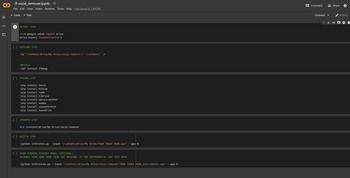
It should look like this.


The GPU conversion work on my side, without manually typing it (I uploaded it from scratch to test again)
 
You're welcome to teamview with me if it will help sort it out. Cahnces are others won't be sing the update either if something is isolating it to just you somehow.

I tried with another Google account and it works fine for me. I need to look up what might be causing it, I'd also need feedback from others.

You did replace the old folder with the new one I uploaded today, right? It wasn't just the .ipynb file that got updated.
 
I tried with another Google account and it works fine for me. I need to look up what might be causing it, I'd also need feedback from others.

You did replace the old folder with the new one I uploaded today, right? It wasn't just the .ipynb file that got updated.

OK. updated both with the new files. I now have what you do. I'd edit the main post to advise this as I didn't know until we quoted each other to inform me otherwise.
 
I tried with another Google account and it works fine for me. I need to look up what might be causing it, I'd also need feedback from others.

You did replace the old folder with the new one I uploaded today, right? It wasn't just the .ipynb file that got updated.

Wonder if we can get [MENTION=39673]Anjok[/MENTION] to train with Timmy T. - One More Try (Slow version) They used so much reverb in his vocals you can't get it out after 2 passes.
 
So I gave my friend the "vocal remover" folder I had on my google drive and this time it worked. It seems that the one he downloaded on page 1, 2 days ago didn't work for him.
 
===============================================

Google Colab Method

If you encounter issues during the installation of the regular vocal remover or the GUI, you can use this method. It doesn't require any special or powerful hardware, as all of the processes are done in the cloud. 1 track gets processed for around 1 minute.

STEPS:

Delete everything from the old Colab project, including the folder in your Google Drive, before updating!


1. Download this archive and upload the folder "vocal-remover" to your Google Drive.
https://mega.nz/file/0eozTLob#5LtaWtVYBSysjoG5LnV7wHltIWwg4fARlA2qJctm8T0

2. Go to https://colab.research.google.com/ and click on "Upload".

3. Download this file and upload it to Google Colab.
https://mega.nz/file/lHw3VDiA#y-HqBeuSLPvEa6yXwcFGjZmunbNs61rVsjuiRyhMmvE

4. When you open the project, you'll see a couple of steps that I've numbered to be easy to follow. Just click each one and wait until it gets finished.


On the fifth step, where you're choosing which track to process, make sure you've typed its name exactly as it is + the file type (WAV/FLAC/MP3 etc.)


5. Your instrumental & acapella tracks should be found inside the "vocal-remover" folder.


Optional: If you wish for cleaner results, you can run your instrumental (that you just made) through the stacked model. It's the very last step.

Always check the main post for recent changes to save a lot of headache. I colored in red what was recently added to the information.
 
Last edited:
Can't believe how much quicker the latest Google Colabs version is. This is awesome. Thanks so much for all you're hard work!
 
well after being away back to work for 3 weeks and come back to this collab thingymajig (Scottish)..........what can i say........i'm impressed.....works just as fast on my old set up as the vocal remover v2 did on my sons expensive set up..........better instrumentals......wish it would leave some backing vox in but can't complain....defo shit hot.....easy as to follow after watching video from new age ripper