
LiteRECORDS
-
Guest, before your account can be reviewed you must click the activation link sent to your email account. Please ensure you check your junk folders.
If you do not see the link after 24 hours please open a support ticket.
You are using an out of date browser. It may not display this or other websites correctly.
You should upgrade or use an alternative browser.
You should upgrade or use an alternative browser.
Powerful New Vocal Remover AI - Instructions
- Thread starter Anjok
- Start date
The new multi-genre model sounds awesome. But for some reason the new GUI that was just updated is much slower than the one from yesterday. If it takes me 20 seconds to process track with CMD and the first GUI, this one takes 5-6 minutes.
Hmm, 12 seconds for me. 51/51.
Not sure what it is, though the one time I forgot to check the GPU box the conversion took 5-6 minutes.

djtayz
Executive Producer
Hmm, 12 seconds for me. 51/51.
Not sure what it is, though the one time I forgot to check the GPU box the conversion took 5-6 minutes.
My bad (facepalm). I swear when I ran it it was checked but apparently now it has been unchecked the whole time. Thanks for the insight.

Anjok
Superstar DJ
***UPDATE***
A compiled exe version for Windows is in the works for those who are having issues with the Python installs. I'm actually getting some help on it and hope to have it released by this weekend! I'm also going to add the option to save the png mask file that comes with each conversion, as well as the "post-process" option (that's a dev option, don't use it unless you know what you are doing!).
A compiled exe version for Windows is in the works for those who are having issues with the Python installs. I'm actually getting some help on it and hope to have it released by this weekend! I'm also going to add the option to save the png mask file that comes with each conversion, as well as the "post-process" option (that's a dev option, don't use it unless you know what you are doing!).
djtayz
Executive Producer
I also made a Google Colab version of it, for those who wanna use it there (mainly did it for a friend of mine who had issues on Mac).
It all works as intended, though the processing is slow due to not using a GPU. I just need to iron out some few issues and I will upload it here with instructions on how to install it (it's straightforward).
It all works as intended, though the processing is slow due to not using a GPU. I just need to iron out some few issues and I will upload it here with instructions on how to install it (it's straightforward).
Last edited:
Anjok
Superstar DJ
I also made a Google Colab version of it, for those who wanna use it there (mainly did it for a friend of mine who had issues on Mac).
It all works as intended, though the processing is slow due to not using a GPU. I just need to iron out some few issues and I will upload it here with instructions on how to install it (it's straightforward).
Excellent! Great idea!

NewAgeRipper
Superstar DJ
Would it be possible to optimize it a little more by utilizing CPU and GPU to increase processing times on lower end systems?
Last edited:
NewAgeRipper
Superstar DJ
[MENTION=39673]Anjok[/MENTION] Would it be possible to provide an update for the command line method. That would be better for me I think.
Last edited:
NewAgeRipper
Superstar DJ
I also made a Google Colab version of it, for those who wanna use it there (mainly did it for a friend of mine who had issues on Mac).
It all works as intended, though the processing is slow due to not using a GPU. I just need to iron out some few issues and I will upload it here with instructions on how to install it (it's straightforward).
That would be great dude. but you never post a link for it.

NewAgeRipper
Superstar DJ
I feel like something is missing. I followed the steps exactly and cannot get the GUI to open. Made sure all permissions were granted and I only get a command prompt that on first opening said something with an error but didn't stay open long enough to see what the error pertained to.
Anjok
Superstar DJ
That would be great dude. but you never post a link for it.
You can use the model included in the GUI package with the command line version. I will mention though that if the GUI version isn't working with your current settings, those issues will persist with the command line version.
I'll need to see the error output from the flashing cmd screen. Try to get a screen shot of it if you can and post it here. Also, i can confirm CPU/GPU dual processing won't be effective for this AI at all.
NewAgeRipper
Superstar DJ
You can use the model included in the GUI package with the command line version. I will mention though that if the GUI version isn't working with your current settings, those issues will persist with the command line version.
I'll need to see the error output from the flashing cmd screen. Try to get a screen shot of it if you can and post it here. Also, i can confirm CPU/GPU dual processing won't be effective for this AI at all.
I'll try to get a screen shot but doubtful. I'll try and wait on the exe.
the CUDA link is broken. probably because a newer version is out. i'm downloading CUDA 11.0.1 right now.i have an NVIDIA GPU. hopefully it will work after because i followed all of the steps but i just get a cmnd window that pops up and disappears quickly. also, when checking path no python was listed even though i ticked the box to add to path so i just tried adding manually but same results.
NewAgeRipper
Superstar DJ
the CUDA link is broken. probably because a newer version is out. i'm downloading CUDA 11.0.1 right now.i have an NVIDIA GPU. hopefully it will work after because i followed all of the steps but i just get a cmnd window that pops up and disappears quickly. also, when checking path no python was listed even though i ticked the box to add to path so i just tried adding manually but same results.
Exactly. Same here but not getting GUI to open at all. Just command window that opens and closes.
NewAgeRipper
Superstar DJ
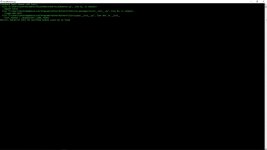
NewAgeRipper
Superstar DJ
Your system isn't detecting PyTorch. Do you have a stand-alone GPU, or is it intel graphics?
This is also a good question^^^
I to uninstalled using Revo uninstaller and started from scratch. Same error as in my screenshot.
Anjok
Superstar DJ
I to uninstalled using Revo uninstaller and started from scratch. Same error as in my screenshot.
I'm going to have to try and recreate this error. I'm sorry you guys have been having issues with it. GIve me a bit of time and see what's going on.
Also, the exe version is still having issues because of PyTorch. I was really hoping to have it released this weekend, but it diesn't look like that's going to happen. =(
Anjok
Superstar DJ
I to uninstalled using Revo uninstaller and started from scratch. Same error as in my screenshot.
I think I figured it out! I tested my instructions on a VM running a bare-boned version of Windows 10 and got the same error you did. The issue is some systems don't play well with PyTorch's Cuda edition (which is the one I linked). Also, many people have various encoders already installed that play well with Python and some don't (especially if we're dealing with someone who's installing this on a fresh version of Windows), so I was getting SoundFile errors too. Installing soundfile fixed that issue though! Please remember to install and configure ffmpeg before trying to run mp3, mp4, m4a, and flac files through this tool!
Leave your installation as is and simply install the following and you should be good. Please let me know if this works for you! I also updated the main thread with these instructions. One thing though, don't check the GPU option if you don't have a stand-alone one installed.
pip install torch==1.5.0+cpu torchvision==0.6.0+cpu -f https://download.pytorch.org/whl/torch_stable.html
pip install SoundFile
Last edited:
Anjok
Superstar DJ
the CUDA link is broken. probably because a newer version is out. i'm downloading CUDA 11.0.1 right now.i have an NVIDIA GPU. hopefully it will work after because i followed all of the steps but i just get a cmnd window that pops up and disappears quickly. also, when checking path no python was listed even though i ticked the box to add to path so i just tried adding manually but same results.
Your issue might be different than NewAgeRipper's.
I tested the link I provided to the Nvidia Cuda driver and it appears to be working for me. You'll need to download 10.1 since that's the version this edition of Pytorch is compatible with. Uninstall Cuda 11 and try the link again. If it doesn't work, google "Nvidia Cuda 10.1 driver". It won't be hard to find. Also, try installing soundfile -
pip install SoundFile
Last edited: