What's new
LiteRECORDS

Register a free account today to become a member! Once signed in, you'll be able to participate on this site by adding your own topics and posts, as well as connect with other members through your own private inbox!

  • Guest, before your account can be reviewed you must click the activation link sent to your email account. Please ensure you check your junk folders.
    If you do not see the link after 24 hours please open a support ticket.

Powerful New Vocal Remover AI - Instructions

Hey guys! I wanted to highlight this bit from my tutorial. I noticed that it can make a huge difference in some tracks and thought it would be very helpful to many of you here -

Note - The WINDOW_SIZE value is universal. The smaller your window size, the better your conversions will be. However, a smaller window size means longer conversions times and heavier resource usage.

Here are the recommended window size values -
1024 - Low conversion quality, shortest conversion time, low resource usage
512 - Average conversion quality, average conversion time, normal resource usage
320 - Better conversion quality, long conversion time, high resource usage
272 - Best conversion quality, longest conversion time, heavy resource usage

**272 is the lowest window size value possible.**

For me the parameters are fixed, I can't change them. This applies to all models, is there a button to unlock them?
 
For me the parameters are fixed, I can't change them. This applies to all models, is there a button to unlock them?

Download the new GUI build 11_23. It has the window size unlocked. Look under the other contributor on Anjoks github.
 
Last edited:
Download the new GUI build 11_23. It has the window size unlocked. Look under the other contributor on Anjoks github.

Ah alright, thanks.

Getting error when trying a window size under 320 though, gonna upload a screenshot.
 
Last edited:
My WINDOWS_SIZE window is blocked, how can I unlock it?

To remove the block you have to remove the "_w512" portion from the model names. This will unlock the window size box. Alternatively, you can download the latest version of the GUI I uploaded to the my GitHub page.
 
Ah alright, thanks.

Getting error when trying a window size under 320 though, gonna upload a screenshot.

For some reason, you can only go from 320 to 288 to 272. Any value between 320 - 288 - 272 won't work. For example 310, 305, 290, 275 won't work. I'm going to update the GUI to include suggested window size values to avoid confusion.
 
Ah alright, thanks.

Getting error when trying a window size under 320 though, gonna upload a screenshot.

Is the error happening when you start the conversion or at the end when it finishes? Mine seems to be working fine at the moment set at 272.

 
My WINDOWS_SIZE window is blocked, how can I unlock it?

Click the github link to get the updated GUI. Look on the right side of the page for a link with "+ 1 release." and you'll find it.You don't even have to set anything else up. just extract it to where you did the other one and make your short-cut with the VocalRemover.py file.
 
For some reason, you can only go from 320 to 288 to 272. Any value between 320 - 288 - 272 won't work. For example 310, 305, 290, 275 won't work. I'm going to update the GUI to include suggested window size values to avoid confusion.

Yup, 272 seems to be working. Going to test in on different song.
 
To remove the block you have to remove the "_w512" portion from the model names. This will unlock the window size box. Alternatively, you can download the latest version of the GUI I uploaded to the my GitHub page.

Well crap. Didn't know I could do a simple edit.
 
I just tested it over here. I'll run everything at 272 now. It takes 1:40 seconds on a 4 minute song instead of well, a few seconds, but my downclocked 1070 seems able to handle it just fine. Gets into the low 70'sC. Worth the wait for maximum quality. Thanks for the heads up :D
 
I just tested it over here. I'll run everything at 272 now. It takes 1:40 seconds on a 4 minute song instead of well, a few seconds, but my downclocked 1070 seems able to handle it just fine. Gets into the low 70'sC. Worth the wait for maximum quality. Thanks for the heads up :D

We'll just come to you for your super computer processing. LOL.
 
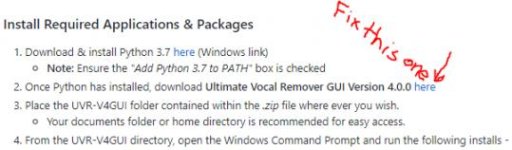
2. Once Python has installed, download Ultimate Vocal Remover GUI Version 4.0.0 here = link is dead?

No, the link isn't dead. Always helps to read back on past help we've given. On the github look to the right of the page and click on "+ 1 Release" underneath Vocal remover 4.0.0. [MENTION=39673]Anjok[/MENTION] really does need to fix that.
 
To remove the block you have to remove the "_w512" portion from the model names. This will unlock the window size box. Alternatively, you can download the latest version of the GUI I uploaded to the my GitHub page.

That did not work for me with v1102 which is what I would prefer to use. I guess whatever does work.
 
[MENTION=39673]Anjok[/MENTION] this is the link we're talking about that needs to be fixed. I also don't see a link for v4.0.1 yet. Or is 11_23 v4.0.1? It was 4.0.0. also when I got 11_23 the first time.


Attachments

  • Fix it.jpg
    Fix it.jpg
    18.2 KB · Views: 3
Last edited:
[MENTION=39673]Anjok[/MENTION] this is the link we're talking about that needs to be fixed. I also don't see a link for v4.0.1 yet. Or is 11_23 v4.0.1? It was 4.0.0. also when I got 11_23 the first time.


I updated that link. It's not working for you? I actually just updated it again today because we released 4.0.1 that includes some bug fixes. Please try it again and let me know if you're still having trouble.